

This guide provides a step-by-step explanation of how to complete your Practicum Application online through our Social Work Information System, or SWIS. Please read through each section carefully as you complete your application, making special note of requirements, policies, and expectations. The Office of Experiential Programs is always available to address questions and concerns by email at oepcp@ua.edu. Your success in practicum begins here, and support is always available!
1. Access SWIS to Apply for Practicum
- Begin by clicking this URL.
- Log in using your myBama password and ID.
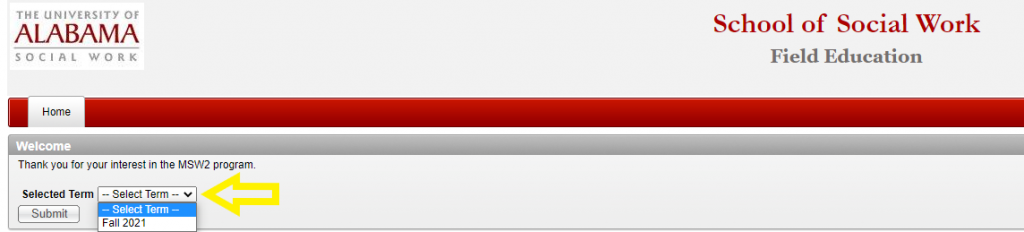
- Carefully select the Term in which you will be entering practicum.
- Please notify the your Practicum Education Coordinator promptly if you accidentally select the wrong term as incorrect application entries are permanent and can cause display errors!
2. Explore the Home Page
- The home page gives you a list of all items that need to be completed for your application to be considered. The only item that you cannot complete at this stage is the Practicum Placement Tracking Form.
- Please note the tabs across the top as well. You will visit each tab in the process of completing your application, starting with “Practicum Application.” You can get to the application by using the tab on the top or clicking on the Practicum Application in the list below.
- Please note that Faculty Recommendations are not currently required, and the tab will not appear in your profile. If you do, however, have a faculty recommendation that you would like to see included, please let your Practicum Education Coordinator know.
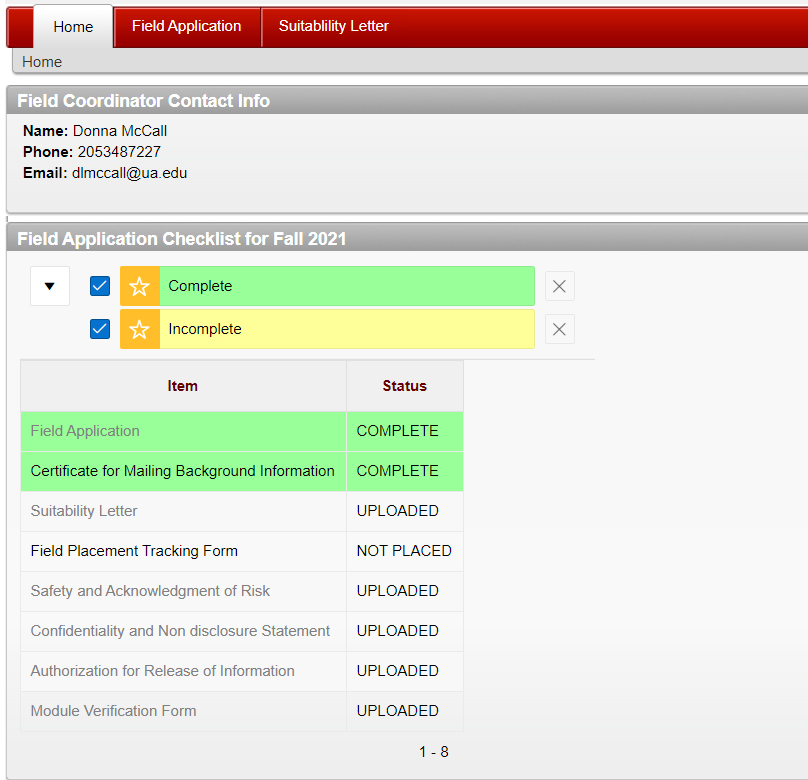
3. Continue to the Application by Clicking on the Field Application Tab (Highlighted in Yellow above)
4. Enter Your Contact Information
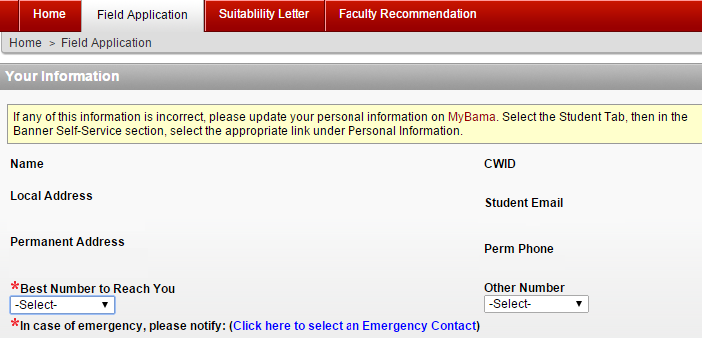
- The information that is preloaded into the following fields is pulled from your myBama account (Banner).
- Please make sure that all the information is correct, as we will use this information to contact you. If it is not, please notify the Office of Information Technology (OIT) to update your Banner account.
- You will also need to select an emergency contact (see blue link in the image below). Your application cannot be completed unless you select an emergency contact.
- If you need to correct any contact information, you will need to login to myBama and make the necessary changes (see instruction in the yellow box below).
5. Complete the Geographic Preference Section
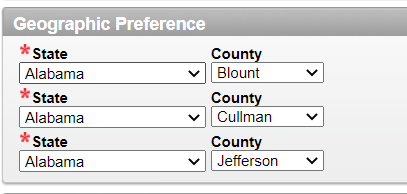
- On-campus/face-to-face students: We do not place on-campus students in other states or in counties far from The University of Alabama. You will need to select your top three counties for placement in order of preference among those closest to Tuscaloosa. Most on campus students select Tuscaloosa and Jefferson counties as their top two choices (be sure to rank them). You will then need to select a third neighboring county.
- Out-of-State students: Please select state and county preferences based on their proximity to the location of your permanent residence.
- Students applying for DC Program or International Placements: Please select DC or International Placement as your first preference and then follow the on-campus or DL cohort instructions for your final two selections.
- Special Note: We strive to place you in your top geographic location, but that is not always possible. Should you need to adjust your geographic preferences due to an unforeseen change to your permanent address, please notify the your Practicum Education Coordinator and Placement Coordinator as soon as possible to discuss next steps. In addition, please keep in mind that the counties you submit as preferences will be where you will be placed, and you are responsible for ensuring this information is correct and best reflects where you will be living at the time of your practicum.
6. MSW Students only: Choose Your Year of Study
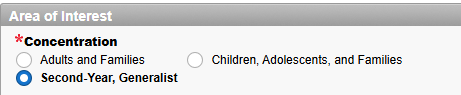
- This section only applies to students in the MSW Program. Please indicate whether you are completing your first practicum by selecting First-Year, Generalist or whether you are completing your second year or Advanced Standing Practicum by selected Second-Year, Generalist . Please make sure to select the correct year as this can impact the available stipends that populate into the application.
Second-Year and Advanced Standing Example
First-Year Example

7. Choose Areas of Interest
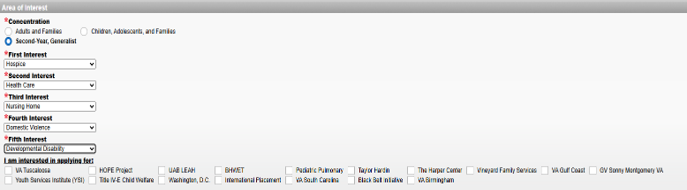
- Next, select your top five areas of interest. We will consider these areas in making your placement. However, depending on location and other factors, placements in areas of top interest are not always possible.
8. MSW Students Only: Select Stipend/Internship Programs
- If you are interested in applying for one of the stipend/internship programs, the corresponding stipend/internship programs will be available for you to check once you select your concentration. If you check that you are interested in stipend program your information will be forwarded to the correct contact person and the agency will contact you for further application processes.
9. Describe your educational goals
- In this section, you will need to describe your educational goals as they relate to your practicum placement. Please note that your educational goals are sent to the agency exactly as they appear here. You will want to proofread carefully and ensure that you clearly communicate them here.
- The narrower in focus you are, the more difficult it is to find agencies who will host you. Consider the following examples of narrow and broad goals.
- Helpful Tips: What will you need to maximize your learning? Hands on experience, shadowing, strong supervision, observation? Be specific!
Narrow Example: “I would like the opportunity to work with children in a medical facility. I have a particular interest in Neonatal Intensive Care Unit.”
Why this is too narrow: If you are not placed in a medical facility with children, other agencies that we send you to will read that statement and think you are not a good fit for them. Instead talk more broadly about your goals.
Broad Example: “While I have interest in working with children in a medical setting, I am open to an internship that will give me the opportunity to work with children who are facing barriers to a successful start in life.”
Why: You will also want to think about including other important educational goals. What do you want to learn? Skills, therapeutic modalities, group techniques, proper documentation?

10. Describe Any Special Circumstances (highlighted in yellow below)
- In this section, please describe any special circumstances that might affect your practicum placement (e.g., need for reasonable accommodations as specified through the Office of Disabilities, need for variable credit hour placement, transportation needs, etc.). Reasonable accommodations will be provided for students with documented disabilities including but not limited to the attentional, physical, sensory, systemic, cognitive, learning, and psychiatric. If you believe you have a disability requiring an accommodation in your practicum setting, please notify the Office of Experiential Programs and the University of Alabama Office of Disability Services as soon as possible. You should request Clinical Accommodations from the Office of Disability Services. The Office of Experiential Programs will work with you to identify an appropriate educational experience and provide the Practicum Instructor, upon confirmation of your disability, any recommend appropriate accommodations. Please note that your accommodations cannot be activated unless they are filed with the Office of Experiential Programs.

11. Add Anything Else (Green above)
- In this section you can tell us anything you would like for us to consider when making your placement. This can be personal (job, family, transportation etc.) or more information about your educational circumstances that you do not want to send to the agency. Some students use this area to discuss background check issues, give more detail about agency interests, or share concerns. Use this section to tell us more if needed.
12. Are There Any Areas of Social Work, Including specific populations, that you are passionate about but may be triggering and should be avoided at this time? Any specific area of work? Any specific population? (Blue Above)
- In this section, you can tell us about any areas of social work that may be more difficult for you to work with and that you would prefer for the Practicum Office to avoid when matching you with an agency.
13. List Your Current Place of Employment (in red in below graphic)
- Please list your current place of employment. This helps us with making placement decisions.
14. List Any Previous Internship (in blue)
- Please list your BSW or MSW Internship Agency Name (if applicable)
15. Answer Transportation Questions (in green below)
- Please answer the transportation questions as access to a vehicle and the ability to drive are often essential to agencies.

16. Indicate whether you will be completing your placement in a state other than Alabama (orange above).
- If you select yes, you should complete the Placement Exploration Tool that auto-populates and upload the completed form to SWIS by the date specified by the Practicum Education Office. It is important that you complete the form as it provides an opportunity for you to share information about agencies in your area where you are interested in completing your hours. There are instructions and a script included in the PET form.
17. Indicate Whether You Will Be Applying for an Employment-Based Placement (in Purple Above)
- Please remember that you can only choose this option for one of your two years. If you choose yes, you can download the application fill it out, and upload it to the practicum application in SWIS. You will need to do this by the specified due date for your cohort.
18. Will You Be Requesting an Extended Placement (Red Above)
- This question only applies to BSW and Advanced Standing MSW students who plan to register for the two variable practicum courses that are taken over two semesters rather than the one practicum course that is taken in one semester.
19. Please select whether you are a Distance Learning or Face-to-Face (Main Campus) student (blue above).
20. Would you like to apply for the Washington, D.C. Program (green above):
- This sections applies to BSW, Advanced Standing, and second-year Traditional MSW students only. If you plan to apply for the Washington, D.C. practicum, select yes and the application will auto-populate. Please complete the application and follow the instructions for submitting the application by the deadline specified for your specific cohort.
21. Upload Resume (in Yellow Above)
- Please upload your resume here. Make sure you include your most recent internship, job experiences, or volunteer experiences. Please proofread as the resume will go directly to the agency. If it is not uploaded, the agency will not receive it, and the agency may decline your internship as a result.

22. Authorize Release of Information (above)

- Please authorize us to send your information to the agency by checking the box. Please note that if you have a FERPA hold on your educational records we cannot send your information without your removing the hold. If we cannot send your information, the Office of Experiential Programs cannot arrange a placement. We will let you know if our system indicates there is a hold. The only information that the agency receives in the initial e-mail is your name, contact information, educational goals, and resume.
- Please Note: There are two buttons at the end of the practicum application “Save” and “Submit.” If you click save, you can go back and make changes until you are complete. If you click submit you can make no further changes. Please make sure that if you click submit, you have completed the process!
*NOW NAVIGATE BACK TO THE HOMEPAGE*
23. Upload Suitability Letter / Background Check Results from Castelbranch / DISA:
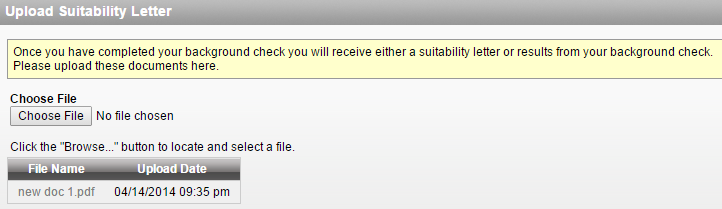
- Once you complete the background check process through Castlebranch/DISA, you will be emailed the results. Please upload the results in this section. If your background check has any results / criminal history listed, please upload the report indicating a criminal record and contact the Office of Experiential Programs as soon as possible.
- Background checks are completed via a third-part vendor, Disa Healthcare Technology. Please review the instructions for completing the background check process here: https://socialwork.ua.edu/wp-content/uploads/sites/14/2025/10/Background-Check.pdf
*NOW RETURN TO THE HOMEPAGE*
24. Forms
- There are several forms that will need to be completed prior to the start of Practicum, including: Module Verification, Acknowledgement of Risk, Confidentiality, and Release of Information. These forms will be shared via DocuSign and must completed digitally prior to the start of practicum placement. They will not longer appear on your home page as they are now digitized within DocuSign.
If at any time you receive an error message, please take screenshots of the following:
- The error message itself
- the screen/menu you were viewing prior to receiving the message, including any button that you clicked to trigger the error message (usually “submit” or “save”)
When you’ve collected both screenshots, please write a brief description of your issue and attach both in an email to the Office of Experiential Programs.
Troubleshooting Tips:
- Use a desktop or laptop rather than a phone or tablet to access SWIS
- Use this link rather than a saved link: ssb.ua.edu/pls/APEX_PROD/f?p=221:20:3893846314537:::::
- Try using a different web browser to access SWIS